What is Raktoken?
Raktoken is a secure 4-digit PIN that you create in the Rakbank app. It allows you to securely approve high-value transactions, add payees, and activate services using a PIN that is known only to you.
Using Raktoken on Online Banking or Another Device
If you are using Online Banking or performing a transaction on a device where Raktoken has not been registered, you will be asked to generate a 6-digit authentication code through the Rakbank app.
To generate the code:
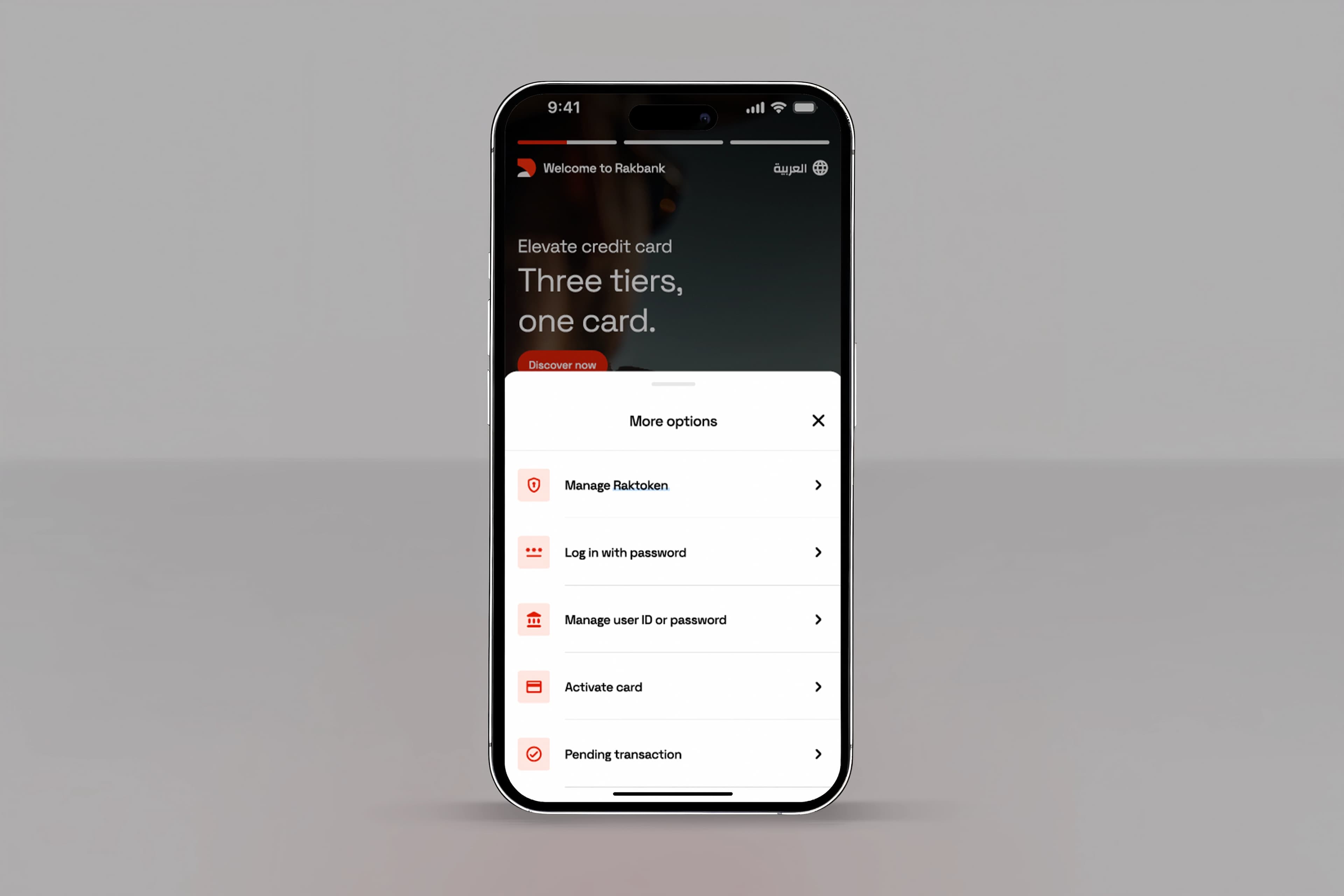
More Options → Manage Raktoken → Generate Raktoken Code → Enter your 4-digit Raktoken PIN → Continue
A 6-digit code will then be displayed, which can be used to securely complete your transaction.

Key benefits
Fast authorisation
Approve transactions right from your app.
Enhanced security
Keep your digital banking experience safe from fraud across all your devices.
No more OTPs
Stay in control with a PIN you create.

Register for Raktoken in minutes
Registering for Raktoken is quick and simple.
Simply follow these easy steps:
- From the landing screen, tap More Options and select Register for Raktoken. Enter your card number and verify with the OTP sent to your registered mobile number.
- Verify your identity with a face scan using your front camera.
- Create your 4-digit Raktoken PIN and confirm it.
- Link your biometrics (optional) so you can use your fingerprint or face recognition for approving high value transactions.
That's it. Raktoken is now set up on your device.
Make sure you keep it somewhere safe for future reference.
How to use Raktoken?
Raktoken works a little differently depending on which device you are using.
If you are using your registered device:
Enter your Raktoken PIN when asked ONLY for a transaction you are performing.
Important: Never share it with anyone in person or over a call.
If you are using other devices:
- We’ll send you a push notification for approval on your registered device
- If you do not receive it, you’ll need to manually generate and enter a code by following these steps:
- Open the Rakbank app on your registered device
- Select More options from the main screen before logging in
- Select Manage Raktoken
- Select Generate Raktoken Code
- Enter your Raktoken PIN
- Enter the code on your web or desktop screen
Your security comes first.
Remember: Each code is valid for 2 minutes only.
FAQs


Bank on the go, anytime, anywhere
Discover the Rakbank app and enjoy digital banking designed to fit your day. Manage your accounts, make secure transactions, and access smart features all in one simple, easy-to-use app
